

What is a video management system (VMS)?
 By Muhammad Talha · Product Manager and CTONine years building computer vision and automated surveillance systems · Updated
 A video management system, or VMS, is the software that takes in the streams from security cameras and records, stores, shows, searches and exports their video, and controls who may see which camera. It is the layer an operator actually uses: the live wall, the playback timeline, the export button and the user list. Cameras and recorders are hardware; the VMS is what makes them one system.
The term is also written as video management software; the two mean the same thing. Much of the confusion around it comes from mixing up the software with the box it runs on, so “VMS device” and “VMS recording” are answered directly below. This guide covers the category: what a VMS does, how it relates to cameras, NVRs and DVRs, the three forms it is sold in, and what to check before choosing one. The glossary carries the short definition of a VMS, and the cloud VMS form has a guide of its own.
What does a VMS do?
A VMS receives video from cameras, records it, keeps it for a defined period, and lets authorized people watch it live, play it back, search it and export it. Around that core it manages users, raises alerts and connects to other systems. Any product sold as a VMS should do the following.
- Ingest. The VMS connects to each camera and receives its stream, usually over RTSP or through an ONVIF profile. A camera that stops streaming is shown as offline rather than silently dropped.
- Recording. Each stream is written to storage under a rule: continuously, on a schedule, or when an event occurs. The rule is set per camera, because a loading bay and a server room do not need the same treatment.
- Storage and retention. Footage is kept for a number of days or up to a storage cap, then deleted automatically. Enforced retention is what turns a written policy into a fact.
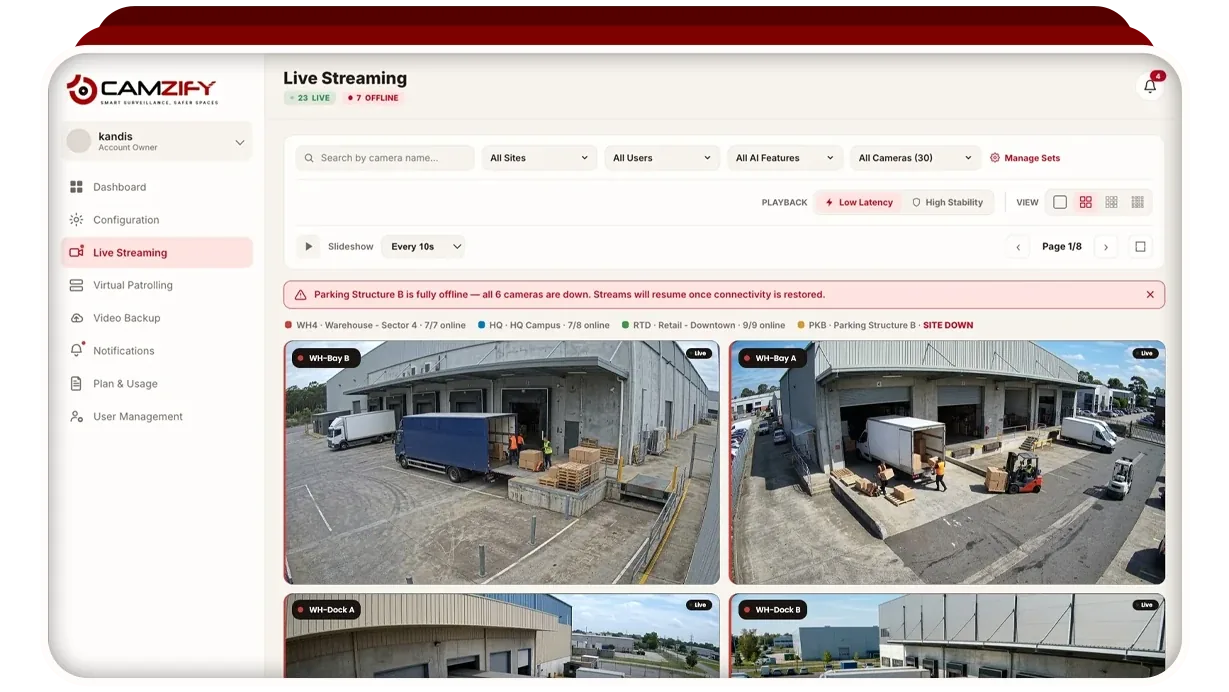
- Live view. Cameras are arranged in a wall, grouped by site or area, and watched from a browser or client.
- Playback. A timeline per camera, with jumps to the events recorded on it, so an operator can go to the minute that matters.
- Search and export. Footage is found by camera and time, and on newer systems by what is in it, then exported as a clip for police, an insurer or a client.
- Users and permissions. Named users, each scoped to the cameras and functions they need, with a log of who viewed, exported or changed what.
- Alerts. Motion, a camera going offline, or an analytics detection is delivered to a named person by email, SMS, a messaging app or push notification.
- Integrations. Access control, alarm panels, intercoms and analytics engines connect to the VMS so an event in one system pulls up video from another.
Is a VMS a device, or software?
A VMS is software. There is no such thing as a VMS device in the strict sense, but the software has to run somewhere, and the place it runs is often called by the same name. That is why a search for a VMS device turns up NVRs, servers and cloud subscriptions together.
The pieces of a camera system divide cleanly (what CCTV is covers them from the start). Cameras capture and encode video; a DVR takes analog camera signals, digitizes them and records them to its own disks; a network video recorder, or NVR, takes streams that IP cameras have already encoded and records those. The VMS is the management layer on top: it decides what is recorded, for how long, who can watch it and what happens when something is detected.
Every DVR and NVR runs a VMS of some kind, embedded in its firmware, which is where the confusion starts. The recorder is the device; the software inside it is the VMS. A standalone VMS does the same job without being tied to one box: it can manage cameras from several manufacturers, on a server the site sizes itself or in the cloud with no recorder at all.
What is VMS recording?
VMS recording is the function that writes camera streams to storage under a rule the operator sets. The rule has three parts: when to record, how long to keep what was recorded, and where to write it. The first two are set per camera; the third is decided by how the VMS is deployed.
Continuous recording writes every frame from every camera and costs the most storage. Scheduled recording writes during set hours, such as overnight at a site staffed by day. Event recording writes only when something triggers it, typically motion or an analytics detection, and is the cheapest to store but the easiest to get wrong, because a missed trigger is footage that was never kept.
Retention closes the loop. A VMS keeps each camera’s footage for a set number of days or until a storage cap is reached, then deletes the oldest automatically. On a recorder the ceiling is the disks fitted at installation; on a cloud VMS it is the storage the account holds, spent across cameras as the operator chooses.
What are the deployment forms of a VMS?
A VMS is sold in three forms: as software on a server the customer owns, embedded in a recorder, or as a service in the cloud. All three do the jobs listed above; they differ in who owns the hardware, where the footage lives, how remote viewing works and what happens when something fails.
An on-premise VMS runs on a server inside the building, licensed per server or per camera channel and maintained by the site or its integrator. It is strongest where deep integration with access control and building systems is required, where footage must by policy stay on site, and where the internet connection cannot carry every camera upstream. The costs are the server, its storage, the people who maintain it, and a single point of failure for every camera on it.
A recorder-embedded VMS is the software inside an NVR or DVR. It is the simplest to buy, and for one site with a handful of cameras it is often enough. Its limits are fixed at purchase: the number of channels, the disks fitted, the manufacturer’s own camera support, and remote viewing that depends on port forwarding or the vendor’s app.
A cloud VMS runs on infrastructure the vendor operates, and the customer pays per camera. Cameras stream to it, footage is stored off site, every site is on one login, and updates are the vendor’s job. It needs upstream bandwidth for every camera it streams, and footage leaves the building, encrypted, which some policies forbid. The trade-offs are tabled on cloud VMS vs on-premise VMS.
What does a VMS cost?
A VMS costs what its form makes you pay for: an on-premise VMS is mostly up front and in maintenance, a cloud VMS mostly per camera per month. Comparing the two on license price alone misses most of the bill.
On premises, the software is generally licensed per server or per camera channel, and the rest is bought separately: the server, its disks, and someone to keep both running. The ongoing maintenance costs are the ones that surprise people: replacing failed disks, adding storage as cameras or retention grow, software upgrades, and the integrator visits that come with each.
In the cloud, the cost is generally a subscription per camera per month, with storage either included or sold separately, and the hardware, upgrades and off-site copy are the vendor’s. What drives that bill (cameras, AI features per camera, retention, bandwidth, sites) is broken down in what a cloud VMS costs.
Camzify is priced per instance per month and quoted per site. It starts from $5 per camera per month, and most cameras land between $20 and $90 per camera per month depending on which detections run and whether patrol rounds are on, with cloud storage per terabyte per month on top. The pricing page builds a quote from your camera and feature counts.
What should you look for when choosing a VMS?
Start with whether it works with the cameras you already own, and then with whether recording, retention and access are controlled per camera rather than per box. Get those two wrong and no other feature recovers the cost.
- Camera compatibility. The VMS should connect any camera that speaks ONVIF or produces an RTSP stream, which covers most IP cameras from the last decade, without a hardware swap. ONVIF and RTSP explained covers both standards.
- Retention control. Retention should be set per camera, in days or as a storage cap, and enforced by automatic deletion, so a camera that needs ninety days and one that needs seven do not share a rule.
- Remote access. Viewing from outside the building should not depend on a VPN, port forwarding or a vendor app; a browser login is the safest form.
- Multi-site management. Every site should be visible from one console, folded together or held separate per client, with users scoped to their own sites.
- Analytics. Detections should fire on a confirmed object track rather than pixel motion, so a shadow or a light change does not raise an alert, and reach a named person with an acknowledgment trail.
- Licensing model. Know what a license unit is (a server, a channel, a camera, an instance) and what it includes. A per-camera figure without storage, analytics or support is not comparable with one that includes them.
- Exit terms. Ask how footage is exported in bulk, what format it comes in, and what happens to it when the subscription or maintenance contract ends.
Where does Camzify fit?
Camzify is a cloud VMS that runs on the IP cameras a site already owns and adds one thing other VMS products do not: virtual patrolling. Cameras connect over ONVIF, RTSP, RTMP or HTTPS, or through a small connector application inside a private network, with no recorder and no port forwarding. Recording runs continuously or on a schedule, retention is set per camera, and every site sits on one login.
The Camzify console covers the functions above, and 23 detections run on the same streams, each firing on a confirmed object track. Virtual patrolling is the part a VMS does not usually have: a scheduled round through the cameras that checks a list at each stop, notifies the guard on a failure and files a timestamped report. It does not replace an NVR or integrate with alarm panels; Camzify vs traditional VMS says where an on-premise VMS is the better purchase.
Pricing is per instance per month and quoted per site, from $5 per camera per month. Streams are encrypted in transit over TLS 1.2 or higher and footage at rest with AES-256; the PDPA, GDPR, SOC 2 Type II and ISO 27001 work is in progress and none is held yet.