

Alarm verification with cameras
Video alarm verification is looking at the alarmed area before dispatching to it: the camera view, a snapshot of what triggered, and the live feed, on the operator's desk at the moment the alarm comes in. Most alarm signals are not intrusions, and every dispatch to one costs a driver, a keyholder and credibility. Camzify puts the visual side of alarm monitoring on the cameras already at the site, with its own detections, alerts and record.
- Snapshot and live feed at the moment of the alarm
- Person detections that stay quiet for a cat
- A record of what the operator saw
A contact closed. Nobody knows why.
An alarm panel reports that a sensor tripped. It does not report that a delivery driver used the wrong door, that a balloon drifted past a PIR, or that a window sensor has been failing since the storm. The monitoring operator has a signal and a decision, and the safe decision is to dispatch, which is how a driver and a keyholder end up at an empty warehouse at 3am.
The site has cameras on that yard. The operator cannot see them, or can see a frozen frame from an NVR nobody has logged into since installation.
“Dock door left unsecured after delivery — confirm and lock.”
Unacknowledged alerts escalate to the backup contact after the configured window.
The camera answers the question the panel cannot
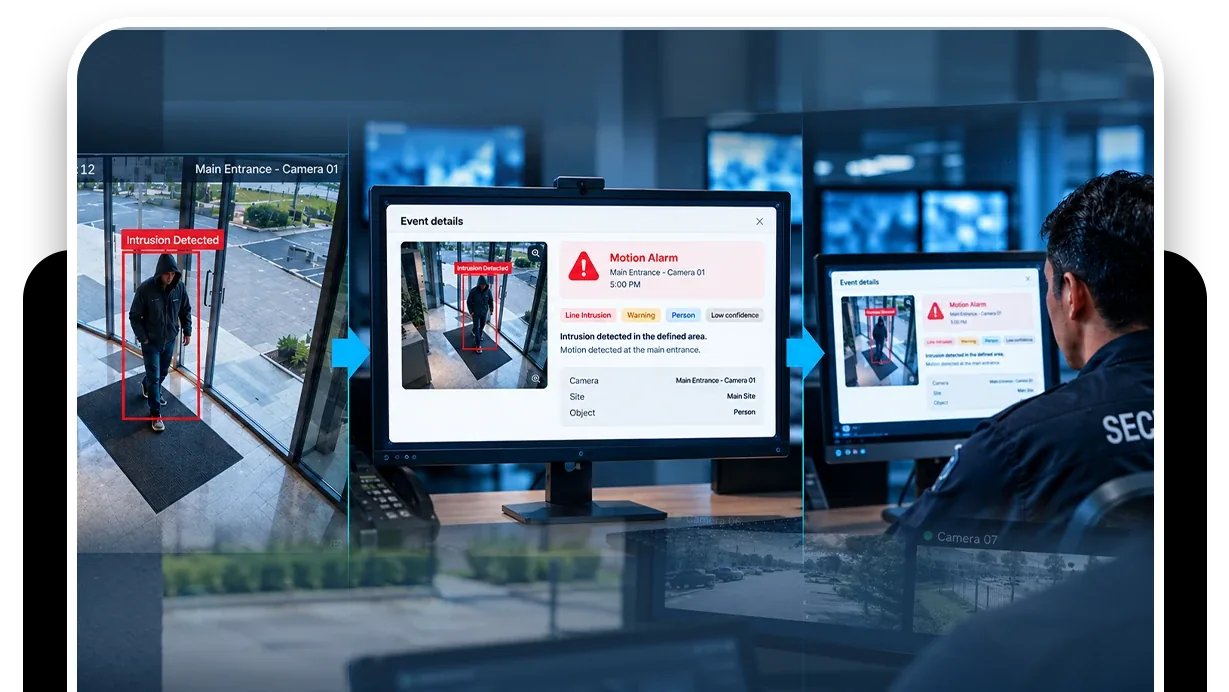
What reaches the operator is the alert, the live feed and the seconds before the alarm.
- Zone intrusion detection on the camera covering the alarmed area raises its own alert with a snapshot when a tracked person is inside the zone during the notification window on that camera.
- The operator sees the person, or sees an empty yard, and decides.
- The live wall shows the feed.
- For playback, cloud backup holds the seconds before the alarm.
After the decision, a patrol round can check the site and record it: yard clear, doors closed, camera unobstructed, with a frame per item. The account model puts every client or agency under one console with a scoped login each; the monitoring companies page covers how that is set up.
Zone intrusion detection
The alarmed area as a zone. A tracked person inside it during the window raises an alert with a snapshot.
DetectionLine intrusion detection
A tripwire on the fence or the door the sensor covers, with direction.
DetectionCamera tampering detection
The alarm and a covered camera together are the case to dispatch on.
DetectionMulti-object tracking
The reason a person rule does not fire for a cat, a bag or a headlight.
- No person in rear yardCompliant
- Rear door closedCompliant
- Fence line intactCompliant
- Camera view unobstructedCompliant
A failed item is resolved as Fixed or Pending before the round can close.
What a post-alarm round checks
Verification is the moment; the round is the record. After an alarm is stood down, a manual round from the console walks the site's cameras and records each item with its frame, so the file shows not only that the operator saw an empty yard but that the yard, the door and the fence were checked and found in order at that time.
Where the site runs scheduled rounds, the reports on either side of the alarm bound it before anyone opens footage.
A check found Not Compliant captures a snapshot and messages the guard designated for that camera; on a manual round the operator chooses to send it, on an automated round it goes on its own. The item stays Pending until it is marked Fixed, which captures the after frame, and the report shows both.
The footage around every frame in that report stays under the camera's own retention window on cloud video surveillance, on the same account, so the still and the video it came from are never in two systems.
What it will not do
Four limits apply, each following from it being video and not a panel.
- It will not receive alarm signals or replace alarm receiving software; it is the video side, on the same desk.
- It will not verify an alarm in an area with no camera, or with a camera that has gone dark.
- It will not decide; it shows the operator what is there and records what they saw.
- It does not identify anyone.
We do not publish false-alarm reduction figures or dispatch-time figures. The trust page sets out the policy.
Industries where this applies
Frequently asked questions
Ready to patrol your site 24/7?
Book a 15-minute demo and see a live patrol run on your own cameras.