

Patrol compliance tracking
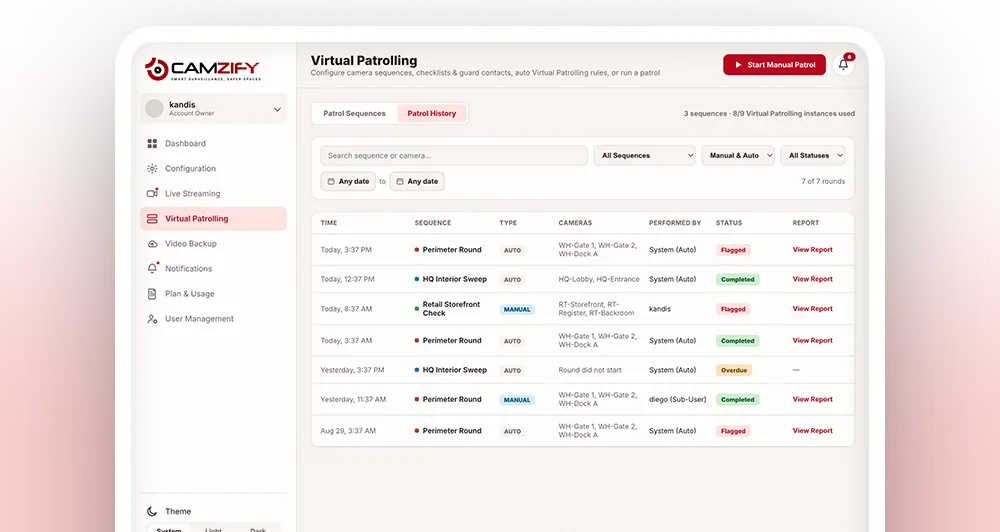
Patrol compliance tracking is the measurement of rounds completed versus rounds scheduled across all virtual patrol sequences. Every round is logged with a status — Completed, Flagged, or Overdue — and a compliance percentage. The dashboard surfaces a single compliance figure across all sites.
Why compliance tracking matters
A scheduled patrol that silently fails to run leaves no obvious signal. Nobody gets an alert when a round simply doesn't happen, the gap only surfaces later, if someone notices footage was never reviewed or an incident report comes up with nothing to reference.
Tracking compliance by memory or a paper sign-off sheet doesn't scale once there are multiple sequences, shifts, and sites involved, and it can't distinguish a round that happened and found something wrong from one that never happened at all.
Logging every round's status and compliance percentage against a timestamp turns patrol activity into a number that can be tracked over time, per site, per sequence, or across the whole operation, so a slipping trend shows up on the dashboard well before it becomes an incident.
- 01Round scheduled
- 02Did it run on time?
- 03Did every item pass?
- 04Completed · Flagged · Overdue
How a round's status is determined
- 01The round completes and every checklist item's result is collected
- 02Compliant items are divided by total items to give the round's compliance percentage
- 03If any item came back Not Compliant, the round is marked Flagged
- 04If the round never executed by its scheduled time, it's marked Overdue instead
- 05The status and percentage are written to the patrol log for that round
What compliance tracking provides
Round status
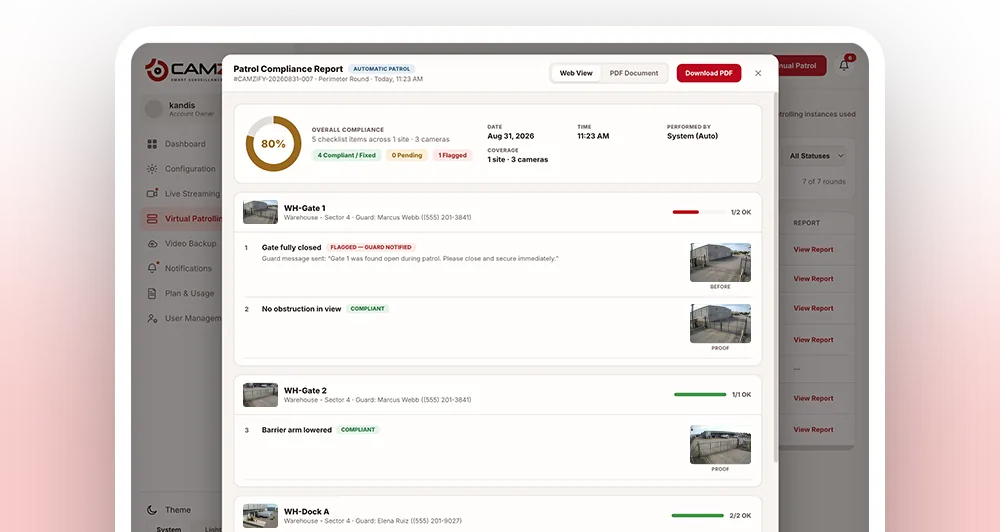
Every patrol is categorised: Completed (all items answered), Flagged (failures found), or Overdue (scheduled round did not execute).
Compliance percentage
Per-round and aggregate. Shows compliant items as a proportion of total items checked.
Filterable patrol log
Filter by sequence, patrol type (manual or auto), status, and date range.
Dashboard integration
The overall patrol compliance percentage appears on the main dashboard alongside camera uptime and AI alert counts.
- 01Set a compliance threshold
- 02Each round is scored
- 03Falls below it?
- 04Flagged and exportable
Exporting reports and setting thresholds
Compliance data isn't only for the live dashboard. Most teams also need to pull it into a broader review process, or get flagged before a shift ends rather than after.
- • Compliance reports can be exported for a custom date range, filtered by site or sequence
- • Alert thresholds can be set so a compliance percentage dropping below a chosen level flags on the dashboard
- • Overdue rounds are called out separately from low-compliance rounds, so a missed patrol doesn't get buried in an otherwise healthy score
- • Historical reports keep the checklist and status active at the time, so past exports stay accurate after checklists change
Frequently asked questions
Ready to patrol your site 24/7?
Book a 15-minute demo and see a live patrol run on your own cameras.