

What is a cloud VMS?
 By Muhammad Talha · Product Manager and CTONine years building computer vision and automated surveillance systems · Updated
 A cloud VMS is a video management system that runs as a service in the cloud: cameras stream to it, it records and stores their footage, and every function is used from a browser instead of from a server or recorder on site. It replaces the on-premise VMS server and the NVR with a per-camera subscription, and it keeps the cameras a site already owns.
At the narrow end of the term, a cloud VMS is remote recording and playback. At the wide end it is the whole video operation on one login: live viewing across sites, retention per camera, users and permissions, alerts, analytics and, on the cloud VMS this site describes, scheduled patrol rounds. That wider model is what the industry now calls cloud video surveillance, and Camzify is one product built on it. This guide is about the category rather than the product: what a cloud VMS does, how it differs from the two things it is most often confused with, what to look for, and when it is the wrong purchase.
What does a cloud VMS do?
A cloud VMS does the four jobs every video management system has always done, and does them for every site from one place. It connects the cameras, shows them live, records and keeps their footage for a defined period, and decides who may see which camera. What changes in the cloud is that none of those jobs depends on a machine in the building.
In practice, the functions a buyer should expect are these.
- Camera connection over open standards. A cloud VMS built on ONVIF and RTSP takes the stream a camera already produces; a camera on a private network is relayed by a small connector application, so no port is opened on the router. The protocols are explained in ONVIF and RTSP explained.
- Live viewing from a browser: a multi-camera wall grouped by site, with an explicit offline state for any camera that has stopped streaming.
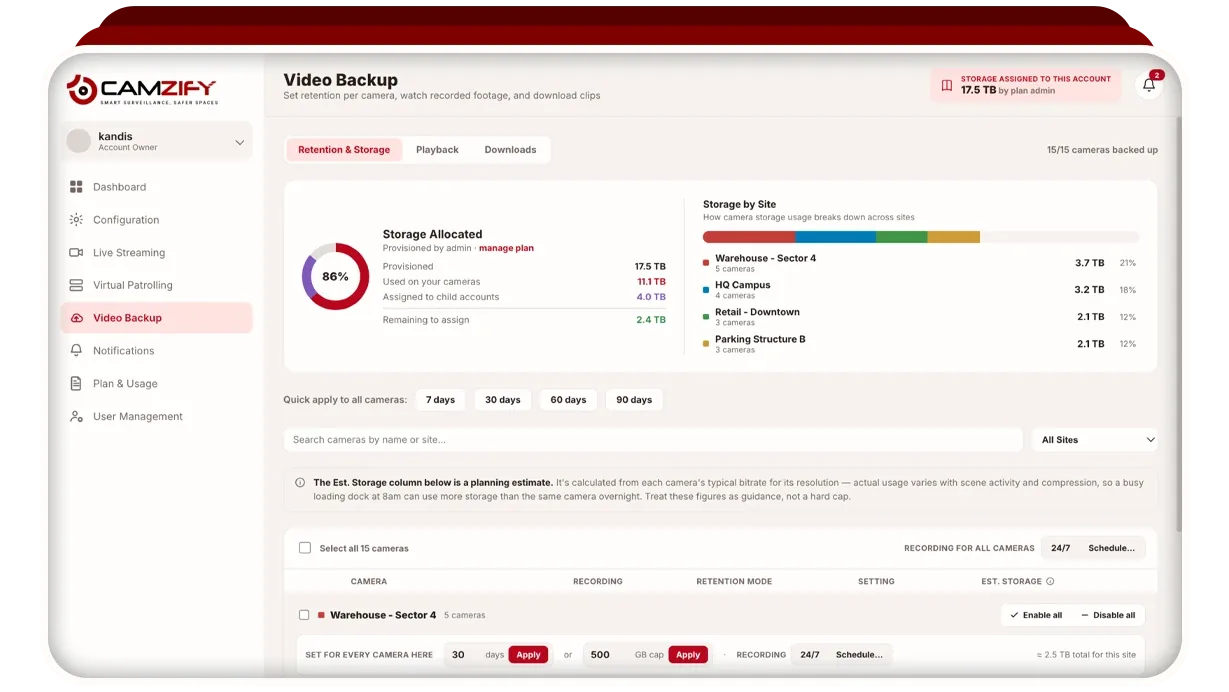
- Recording and retention set per camera, continuously or on a schedule, kept for a number of days or up to a storage cap, with playback and export from the same browser. The retention screen shown above is the video backup and retention module.
- Users and permissions: named users, page-level access, and create, read, update and delete rights per resource, with every action written to an audit trail.
- Multi-site management: every site set up independently and read from one console, folded together or held separate, which is the feature that stops a company running one recorder and one login per building.
- Alerts and analytics on top of the recording: detections delivered to a named person by email, SMS, WhatsApp or push, and trends reported per site and per feature.
How is a cloud VMS different from an on-premise VMS?
An on-premise VMS runs on a server the customer buys, installs and maintains inside the building; a cloud VMS runs on infrastructure the vendor operates, and the customer pays per camera. The software does a similar job in both cases. The difference is who owns the hardware, where the footage lives, and what happens when something fails.
With an on-premise VMS the server is the single point of failure for every camera on it, remote viewing needs a VPN or port forwarding, each additional site usually means another server and another login, and updates are a task for an on-site IT team. With a cloud VMS a camera going offline is shown as offline while the others keep recording, viewing from elsewhere is the default, a new site is added to the same console, and updates are the vendor's job.
The trade runs the other way on two points. An on-premise VMS needs no upstream bandwidth beyond the local network, and its footage never leaves the building unless someone exports it. A cloud VMS needs bandwidth for every camera it streams and sends footage off site, encrypted. The full table is on cloud VMS vs on-premise VMS, and a recorder-centered system is set against a cloud one on Camzify vs traditional VMS.
Is a cloud VMS the same as a cloud NVR?
No, although the two terms are used for the same products. A cloud NVR is the recording function of a network video recorder moved into the cloud: footage is stored off site and played back from a browser. A cloud VMS includes that function and adds the management layer around it.
The distinction matters when you compare products. Something sold as a cloud NVR may record and play back and do little else, which is fine if recording is all you need. A cloud VMS is expected to set retention per camera rather than per box, put every site on one login, scope users to their own cameras, and carry alerts and analytics on the same streams. If the phrase you know is cloud NVR, treat it as the floor of what a cloud VMS does, not the whole of it.
What should you look for in a cloud VMS?
Look first at whether it takes the cameras you already own, and second at whether retention, access and storage are controlled at the level of a single camera. Those two questions decide most of the cost and most of the compliance outcome. The rest of the list follows from how the system will actually be run.
- Open camera support. The system should connect any ONVIF or RTSP camera without a hardware swap, and should offer a way to reach cameras on a private network without port forwarding.
- Retention per camera, in days or as a storage cap, enforced by automatic deletion. A written retention policy the system does not enforce protects nobody; video retention requirements explains how to set the number.
- Encryption in transit and at rest, stated plainly, and an honest account of certification status. Camzify encrypts streams over TLS 1.2 or higher and footage at rest with AES-256; its PDPA, GDPR, SOC 2 Type II and ISO 27001 work is in progress and none is held, and the trust page says so.
- Permission groups that scope a user to their own sites and cameras, with a full audit trail. For a security agency or a monitoring center this extends to sub-users who can create their own, with license quota allocated from the parent account.
- A single console for every site, with the option to fold sites together or hold them separate per client.
- Something that turns recording into watching. Detections that fire on a confirmed object track rather than pixel motion, and, on Camzify, virtual patrolling: a scheduled round through the cameras that checks a list at each stop, notifies the guard on a failure and files a timestamped report.
- Access from a phone through the browser, with no dependency on a native app that may not yet exist.
When is an on-premise VMS still the better choice?
An on-premise VMS is the better choice when the site cannot carry its cameras upstream, when footage must by policy never leave the building, or when local recording for occasional review is all that is wanted. Those are real cases, and a cloud VMS does not win them. A vendor that says otherwise is selling rather than advising.
Bandwidth is the most common reason. A cloud VMS streams every enabled camera continuously, and the upstream capacity that needs depends on resolution, frame rate and codec. A site on a thin or metered connection, or one whose upstream is already committed to other traffic, will either drop frames or starve the rest of the network.
Policy is the second. Some organizations are bound by contract, regulation or internal rule to keep footage on premises, and encryption in transit does not change where the data ends up. In that case the recorder stays. The third is the simplest: one site, one recorder that works, and nobody who needs to watch it from elsewhere has no problem for a cloud VMS to solve.
The two can also coexist. A site can keep its on-premise recorder as the local archive and add a cloud VMS on the same cameras for a second copy under its own retention, remote viewing, detections and patrol rounds. That is often the right answer for a site that has one of the constraints above on some cameras and none of them on the rest.