

Cloud NVR explained: recording without a recorder
 By Muhammad Talha · Product Manager and CTONine years building computer vision and automated surveillance systems · Updated
 A cloud NVR is a network video recorder that runs as a service in the cloud instead of as a box on site: the cameras stream to it, it records them, and the footage is played back from a browser. The cameras stay where they are; the recorder, its disks and its login are what go.
The phrase is a search term more than a product category. What it describes is the recording half of cloud video surveillance, and on Camzify that recording sits inside a cloud VMS that also carries live view, AI detections and scheduled patrol rounds on the same streams. This guide answers the questions a site with an NVR or DVR asks before moving: how recording works with no box, what happens to the cameras, what the cloud adds, and when the recorder should stay.
Does a cloud NVR exist, and what is it?
Yes, although few products call themselves one. A cloud NVR is the recording function of a cloud video management system: cameras send their streams to storage outside the building, and the recording, retention, playback and export that a recorder used to do on a disk happen there instead. Cloud NVR is what buyers type; cloud CCTV, cloud camera storage and cloud VMS describe the same shift from the other side.
The distinction that matters is where footage is written. A recorder writes every camera to one disk in one building, and that disk is the single point of failure for all of them. A cloud NVR writes each camera to its own off-site storage as the frames arrive, so a camera going offline is shown as offline while recording of the others continues.
How does recording work without a recorder on site?
The camera streams and the cloud records. Almost every IP camera already produces an RTSP stream, and that stream, sent to Camzify instead of to a recorder, is the recording source. Recording runs continuously or on a schedule set per camera, and a schedule can be applied to a whole site or to every camera at once.
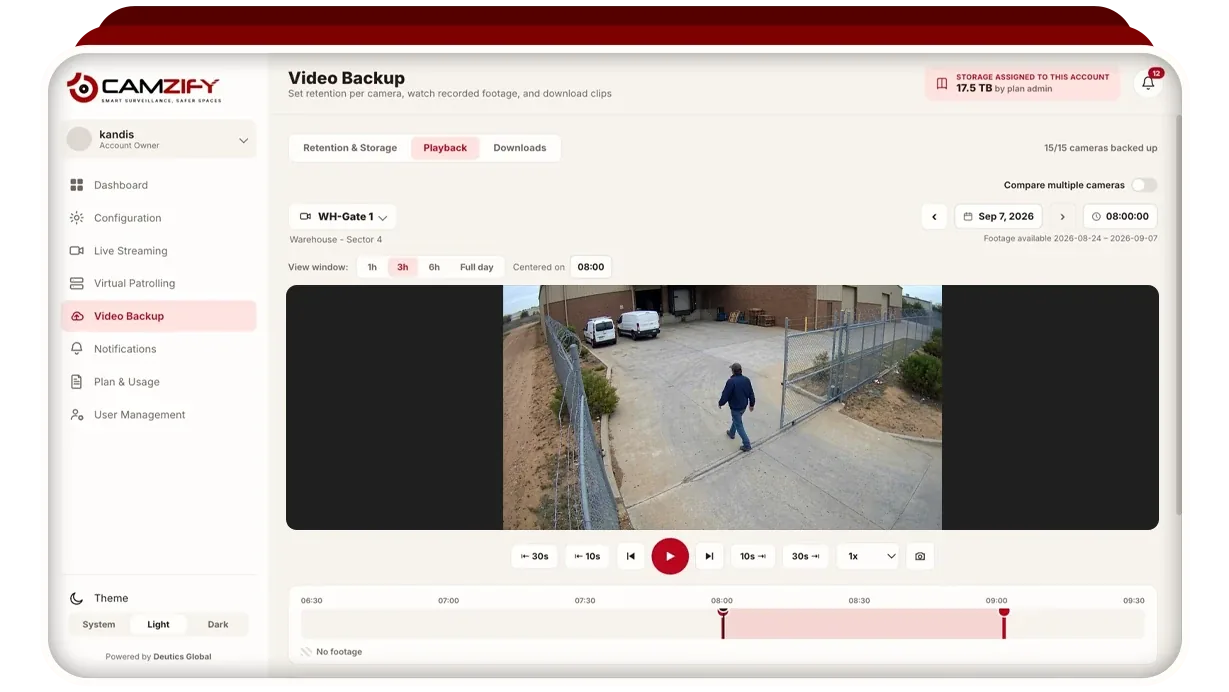
Retention is set per camera, by a number of days or by a storage cap in GB. A camera on a days window drops footage older than the window; a camera on a storage cap rolls its oldest footage off as new footage arrives, and either way the camera keeps recording. Presets of 7, 30, 60 or 90 days can be pushed to every camera on the account in one action. Playback scrubs the recording, several cameras can be compared side by side, and a download exports a clip for the range you choose.
Storage is shown as provisioned, used, assigned to sub-accounts and remaining, never as one blended figure. The storage estimate for a camera is derived from its bitrate, recording hours and retention days, and it is labeled as an estimate because actual consumption varies with scene activity. The video backup and retention page describes the screen in full.
What happens to the cameras I already have?
They stay. Any camera that produces an RTSP stream can be connected, and most IP cameras from the last decade do; RTMP and HTTPS streams, whether HLS or WebRTC, connect as well. Camzify sells no hardware and requires none, so nothing new is mounted.
Cameras on a private network, which is most of them, connect through the Camzify Connector. It is a small application on a Windows, macOS or Linux machine inside that network, often an office PC that is already there, and it makes an outbound connection to Camzify in the same direction as ordinary web traffic. No port is forwarded, no static IP is needed and the cameras are never exposed to the internet. Pan, tilt and zoom control is carried alongside the video for cameras that support it.
The recorder itself can stay as well. A recorder that publishes its cameras as RTSP streams can be the source instead of the cameras, in which case it keeps its local copy and Camzify holds the off-site one. That is the usual first step for a site that is not ready to switch the box off on day one.
What does a cloud NVR do that a recorder cannot?
Five things, and each follows from the footage being in one service rather than on one disk. A recorder keeps footage so that someone can review it after something has happened; a cloud VMS puts the following on the same streams.
- Retention per camera rather than per box. A gate camera can keep ninety days while a corridor keeps seven, instead of every camera sharing one disk and one window.
- Every site on one login. A company with several sites, or an agency with several clients, sees them in one console, folded together or held separate per site, with permission groups deciding who opens which camera, live or recorded.
- AI detections on the recorded streams. Line and zone intrusion, loitering, camera tampering, fire and smoke and the other detection features can be licensed on any connected camera, and a detection opens the footage around it.
- Scheduled patrol rounds. A round runs through the cameras on a schedule, checks a list at each one from the frame, messages the guard responsible for a failure and files a timestamped report. A recorder has no equivalent.
- Footage that survives the theft of the recorder. Everything recorded before the box was taken, smashed or unplugged is already outside the building, which is the case set out in cloud video backup against DVR theft.
Footage off site is still yours. Streams are encrypted in transit over TLS 1.2 or higher and at rest with AES-256, every action on the account is written to an audit trail, and access follows the same permission groups as everything else in the console. Compliance certifications are in progress and none is claimed as held; the security and compliance page lists each one with its status.
When should the recorder stay?
When the site cannot carry its cameras upstream, when footage must not leave the building, or when local review is all that is wanted. A cloud NVR is not the right answer for every site, and a page that says otherwise is selling a box by another name.
- Poor upstream bandwidth. Every camera streamed to the cloud needs upload capacity for as long as it records, while a recorder needs nothing beyond the local network. A site on a thin or metered link should keep its recorder, or record fewer cameras to the cloud; the bandwidth guide sets out how to size the link.
- Footage that must not leave the building. Some sites carry a policy, contractual or regulatory, that recorded video stays on the premises. A cloud NVR sends it out, encrypted, and encryption does not change where it is.
- Local review only. One site, a recorder that works, and nobody who needs to watch it from elsewhere or be told when something happens. The recorder is doing its job, and there is nothing to fix.
- Recording through an outage. Footage is off site up to the moment the router is unplugged or the machine running the Connector is taken; recording stops at that moment and everything before it is kept. A recorder on a battery keeps writing through an internet outage.
The cloud VMS vs on-premise comparison sets the two models against each other row by row, including the rows where on-premise wins.
How do I decide retention before I move?
Set the window first, then the cameras. The video retention requirements guide covers what different sectors and insurers typically expect, and the number you land on is what the per-camera setting enforces, so the policy on paper and the policy in the system stay identical. A recorder has one disk and one window for every camera on it; a cloud NVR lets a cash office and a parking lot carry different windows on the same account.
Then decide which cameras record continuously and which record on a schedule. An interior camera watching an empty office overnight is paying to store twelve hours of nothing, and scheduled recording is the bluntest control on storage cost. Continuous recording is the right default where an incident could happen at any hour, or where an insurer expects unbroken coverage.