

Loitering detection
Loitering detection alerts when a person or vehicle remains in a defined zone beyond a dwell time you set. A brief pass through the zone is ignored. A subject who stays is raised with the frame, the time and how long they have been there, so the difference between someone crossing a forecourt and someone waiting at a back door is the alert itself.
- A person waiting at a rear entrance after closing
- A vehicle parked at a gate or fence line for longer than a drop-off
- Someone lingering in an ATM lobby or a stairwell
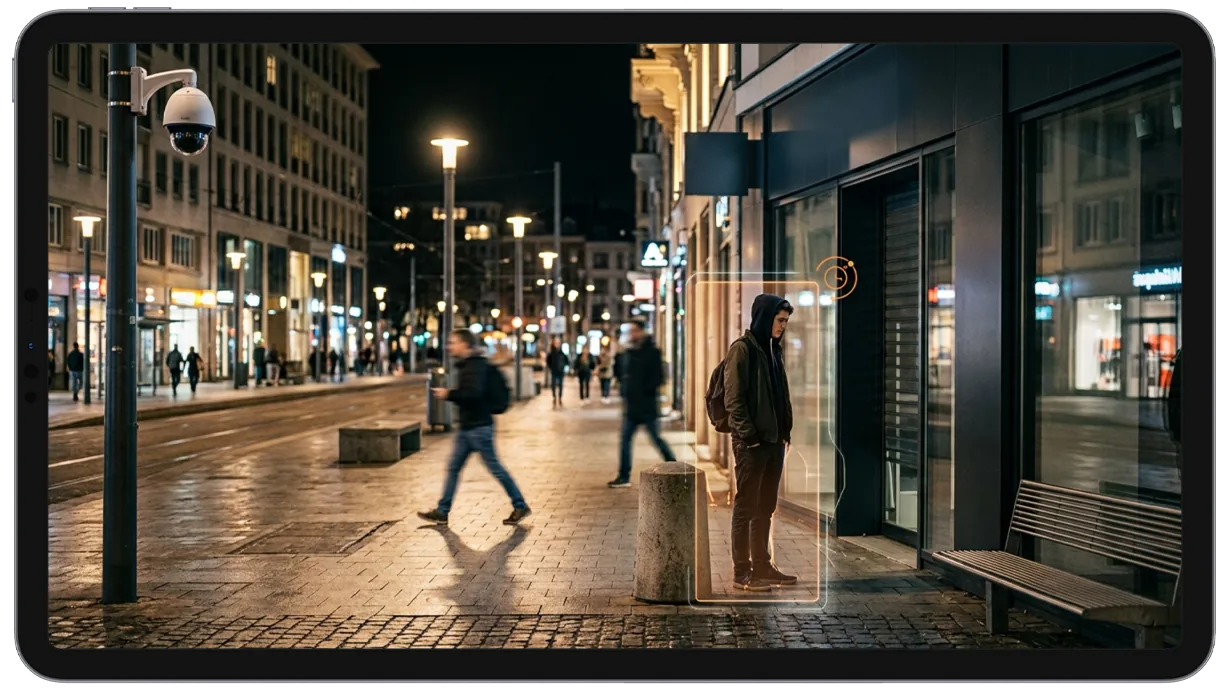
This capability detects and alerts on:
- • A person waiting at a rear entrance or service door after hours
- • A vehicle stopped at a gate, fence line or loading bay beyond a drop-off
- • Someone lingering in an ATM lobby, stairwell or car park aisle
- • A subject standing near a display, cage or stockroom door longer than a shopper would
- • A person remaining on a school perimeter or in a playground after the grounds close
- • A group gathering in a zone where nobody is expected to wait
Why loitering detection matters
Most of what precedes a break-in, a theft or an assault is not a crossing. It is a wait. Someone stands at a back door to see whether anyone comes, sits in a car facing a gate, or circles a cage in a stockroom before reaching in.
Entry-based rules have no way to see that.
- A zone rule fires on everyone who steps in, so a forecourt or a lobby that people are allowed to cross produces alerts nobody reads.
- A motion alarm cannot tell a delivery from a stakeout, because both move.
- A guard on a walking round sees the area for seconds an hour and has no way of knowing how long the person was there before the round.
Loitering detection measures the one thing those tools cannot: time in place. The zone stays quiet for everyone who passes through and raises the person who does not leave, while there is still something to be done about it.
How it works
Defining the zone
An operator draws a polygon over the part of the camera view where waiting matters: the strip in front of a rear door, the ATM vestibule, the approach to a gate. The zone can follow an irregular boundary rather than a rectangle, and a camera can carry more than one.
Measuring dwell time
The detection follows tracks from the same multi-object tracking engine used across the platform. When a confirmed track enters the zone, a timer starts for that track. Leaving the zone ends it. A track that is still inside when the timer passes the threshold you set is the event; a track that left earlier never was.
Alert delivery
The alert carries the frame at the moment the threshold was crossed, the time, the elapsed dwell time and the object type. It follows the same route as every other detection.
- With AI attribute extraction enabled, the alert also carries a plain description of the subject, such as clothing color, so a guard knows who to look for.
- It lands in the notification queue with a severity per camera and an acknowledgment status, and reaches the assigned person by email, SMS, WhatsApp or push.
- Nothing in it identifies the person. It is a track with a duration, not a face.
Configuration
Loitering zones are drawn on the camera view in the configuration panel. Each zone supports:
- • A dwell-time threshold of its own, so a vestibule and a car park aisle can differ
- • A polygon of any shape, matched to the area where waiting matters
- • A notification window per camera, so the zone is quiet while staff are expected
- • A choice of what counts: people only, or people and vehicles
- • More than one zone per camera, each with its own rules
- • A severity per camera, so a rear door can rank above a forecourt
Common scenarios
- • A retail rear entrance where a person waiting after closing is raised before the door is tried
- • A bank branch or ATM lobby where a long stay outside banking hours reaches the monitoring desk
- • A warehouse fence line where a vehicle parked facing the yard is flagged while it is still parked
- • A school perimeter or playground where presence after the grounds close is raised to the caretaker
- • A residential car park where someone moving between vehicles without leaving is the event
- • A stockroom or cage where a subject standing at the door longer than a pick takes is flagged to the floor lead
In a patrol round
During a virtual patrol round, alerts from this detection model contribute to the compliance assessment at each camera stop and are logged in the patrol report. On an automated round, scene observation watches each stop for a short window as well, which is how a round tells a person walking through from a person who is still there.
Frequently asked questions
See the detections on live cameras
A 15-minute demo of the live product: the detections your site needs, running on real camera feeds, and a quote per camera for your sites.