

Occupancy monitoring
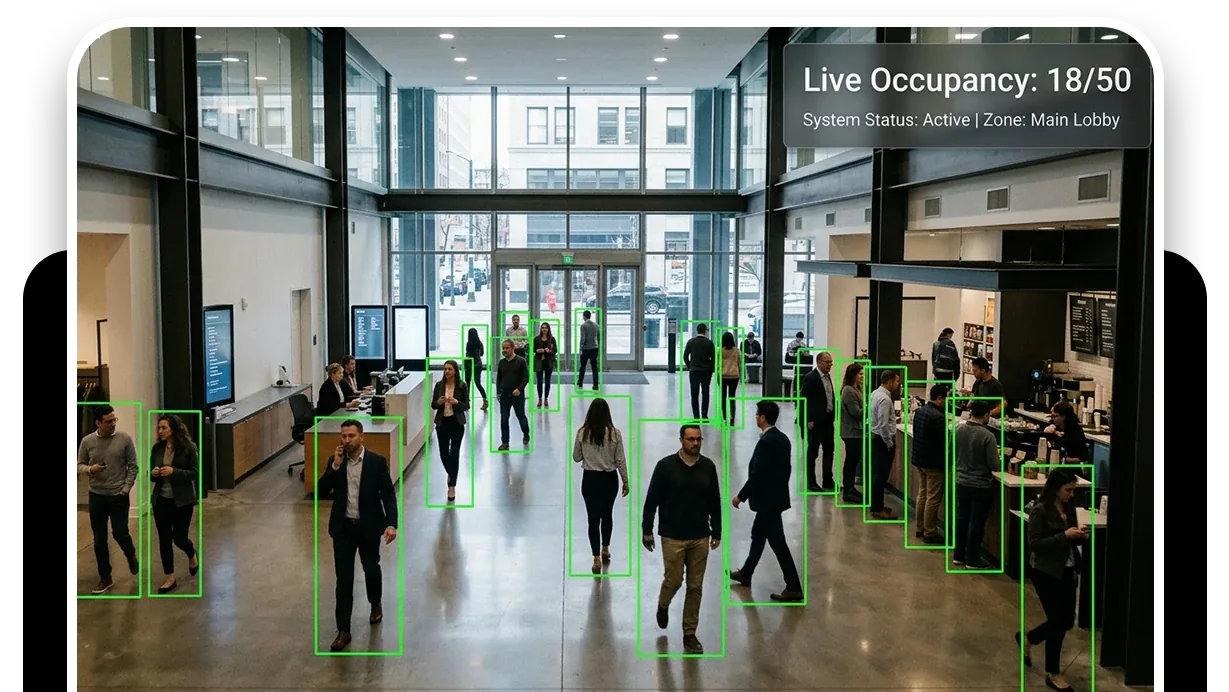
Occupancy monitoring from existing cameras is a live count of people per area, and a record of how that count moves through the day and the week, with no counting hardware added to the floor. It answers when a place is busiest and where, which decides staffing, cleaning and restocking windows and space planning. Camzify counts confirmed tracks per camera or zone, keeps the trend, and flags a pattern that departs from the usual one.
- Counts from confirmed tracks, per zone
- Peak hours per zone and per site
- No counting hardware
Staffing is planned from a guess
When is the floor busiest? The answer is usually a manager's impression, refreshed once a year by a clipboard count on a day that was not typical. Rosters, cleaning windows and restocking are planned from it, and the cost of getting it wrong shows up as queues at one hour and idle staff at another.
The cameras over the floor have been counting the whole time. They were installed for security, and nobody asked them the operational question; how they compare with door counters is in people counters: sensors vs cameras.
- Completed
- Flagged
- Overdue
Counted from the tracking that already runs
Occupancy and peak hour trends aggregates confirmed subject counts from multi-object tracking per camera or zone, continuously, into a live figure and a history.
- The busiest hours and the busiest zones fall out of the history.
- The comparison runs zone by zone within a site or across a multi-site account.
- The cameras are the ones already on the floor for security; there is no counting hardware.
Heatmap anomalies covers the other side of the same data: it learns the usual pattern of activity per zone and flags a departure from it, a crowd where none forms, a corridor busy when it should be empty. A notification window on the camera keeps a known busy period from notifying. The analytics pages hold the trends and export them.
Occupancy and peak hour trends
Live counts per camera or zone from confirmed tracks, and the trend over time.
DetectionHeatmap anomalies
A departure from the usual pattern of activity in a zone, flagged with a notification window.
DetectionMulti-object tracking
The tracks the count is built on. A person is counted once, not once per frame.
DetectionCross-camera journey map
How people move between zones on a site, linked across cameras.
- Queue within marked areaCompliant
- Entrance not congestedNot compliant
- Fire exit clearCompliant
- Staff present at deskCompliant
A failed item is resolved as Fixed or Pending before the round can close.
Where the round fits
Occupancy is continuous and does not need a round; the round adds the conditions a count does not capture.
- The queue is inside its marked area.
- The entrance is not congested.
- The exit is clear when the floor is full.
Run at the known peaks, it records the site as it was at its busiest, with frames, which is what a safety review asks for.
On an automated round, the AI also raises a critical notification for a safety risk it sees, a blocked exit on a full floor for instance, whether or not the checklist asked.
A check found Not Compliant captures a snapshot and messages the guard designated for that camera; on a manual round the operator chooses to send it, on an automated round it goes on its own. The item stays Pending until it is marked Fixed, which captures the after frame, and the report shows both.
The footage around every frame in that report stays under the camera's own retention window on cloud video surveillance, on the same account, so the still and the video it came from are never in two systems.
What it will not do
The count has four limits.
- It will not give an exact headcount in a dense crowd; it gives a reliable trend.
- It will not identify or profile anyone.
- It will not count an area without a camera on it or with a camera pointed at the ceiling.
- It is not a dedicated retail-analytics product with dwell-time funnels and conversion figures; it is what the security cameras can tell you about occupancy, honestly labeled.
We do not publish count accuracy figures. The trust page sets out why.
Industries where this applies
Frequently asked questions
Ready to patrol your site 24/7?
Book a 15-minute demo and see a live patrol run on your own cameras.