

Security audit checklist
 By Muhammad Talha · Product Manager and CTONine years building computer vision and automated surveillance systems · Updated
 A security audit checklist is a written list of the physical security controls at a site, checked one at a time and recorded with a result, so that a gap is found by the audit rather than by an incident. It covers the perimeter, the entrances, the interior, the cameras and their recordings, the alerting and response arrangements, and the documentation that proves each check was made.
The checklist below is written to be walked with. Each item is one line, describes a condition to check rather than a product to buy, and can be answered pass or fail on the spot. It runs in the order an auditor moves through a site, from the fence inward, and ends with the record, because a check nobody can prove was made is not a control.
What does a security audit checklist cover?
A security audit checklist covers six areas: the perimeter, the entrances, the interior, the cameras and recording, alerting and response, and documentation. The first three are the physical layers an intruder would cross in order, the fourth is how the site sees them, the fifth is what happens when something is seen, and the sixth is the proof that all of it was checked.
The order matters because each layer assumes the one before it. A camera that watches a gate nobody locks records a failure rather than preventing one, and an alert routed to a person who has left the company is not an alert. Walk the layers from the outside in and the cause of a failure is usually found in the layer before the one where it shows.
How do you check the perimeter?
Check the perimeter by walking the whole of it, on the outside where you can, after dark as well as in daylight. Most perimeter failures are slow ones, a washed-out fence footing, a pallet stack that has become a ladder, a light that failed months ago, and none of them is visible from the office. The perimeter security use case covers what the fence line cameras can watch between walks.
- The fence or wall is continuous, with no cut, gap, washout or loose panel along its full length.
- Nothing is stacked against the fence on either side that would let a person climb it.
- Every gate closes and latches under its own weight, and is locked at the time the closing schedule says.
- Lighting covers the whole perimeter after dark, with no unlit stretch between fixtures and no fixture out.
- Vegetation and stored material do not hide any part of the fence from the cameras or from the road.
- Adjacent cameras overlap, so no stretch of the perimeter falls between two fields of view.
- Signs stating that the site is monitored are present and legible at every approach.
How do you check entrances and access points?
Check every door, shutter and window that opens to the outside, and check the people and credentials allowed through each one. An entrance fails as often through a stale access list as through a broken lock, so the audit covers the hardware and the register behind it. Unauthorized access detection adds a camera check on the doors that matter most.
- Every external door closes fully and latches on its own without being pulled.
- Every lock works, and every key or credential for it is held by a person who still works here.
- Credentials of everyone who left in the last quarter were revoked on the day they left, and the register shows it.
- Emergency exits open from inside, are alarmed, and are not propped, wedged or chained.
- Loading doors and roller shutters are closed and secured outside delivery hours.
- Visitors are signed in, escorted where the policy requires, and signed out.
- Each entrance has a camera positioned to capture a face at the door rather than the top of a head.
How do you check the interior?
Check the interior against the closing procedure, because most interior controls are conditions that should be true at a particular hour: a room locked, a safe closed, a corridor clear. Audit it once at the end of the day, when the procedure says the site is closed, and once during working hours, when the restricted rooms are in use.
- Restricted rooms, the server room, the cash office, the stores, are locked, and their entries are logged.
- High-value stock and equipment are kept where a camera can see them, not in a blind corner.
- Corridors, stairwells and escape routes are clear of stock, pallets and anything else that would slow an evacuation.
- Safes, cash drawers and tills are closed and locked outside operating hours.
- Windows reachable from the ground or from a flat roof are closed and locked.
- Master keys and key safes are accounted for, and the last sign-out of each is recorded.
How do you check cameras and recording?
Check each camera for whether it still sees what it was installed to see, and check the recorder for whether it has kept what the policy says it should. A camera that is online is not necessarily useful: it can be misaligned, obscured by growth, fogged, or pointed at a wall since the last refit. Camera tampering detection catches the sudden versions of these failures between audits.
- Every camera on the plan is online, and its live view matches the view recorded on the plan.
- No camera is obstructed, misaligned, out of focus, fogged, or facing into glare at the hours that matter.
- The recorded image at each entrance is clear enough to identify a person, checked by playing back a real entry.
- Recording is running on every camera under the schedule set for it, and any gap in the timeline is explained.
- Retention on each camera matches the written policy, and footage from the oldest day of that window plays back.
- The clock on every camera and recorder is correct and synchronized, so timestamps can be relied on as evidence.
- A clip can be exported from any camera in the time the procedure allows, tested by exporting one during the audit.
- Live view and playback are limited to named users, and everyone who has left has been removed.
The retention item deserves a number rather than a judgment; video retention requirements explains how to set it per camera.
How do you check alerting and response?
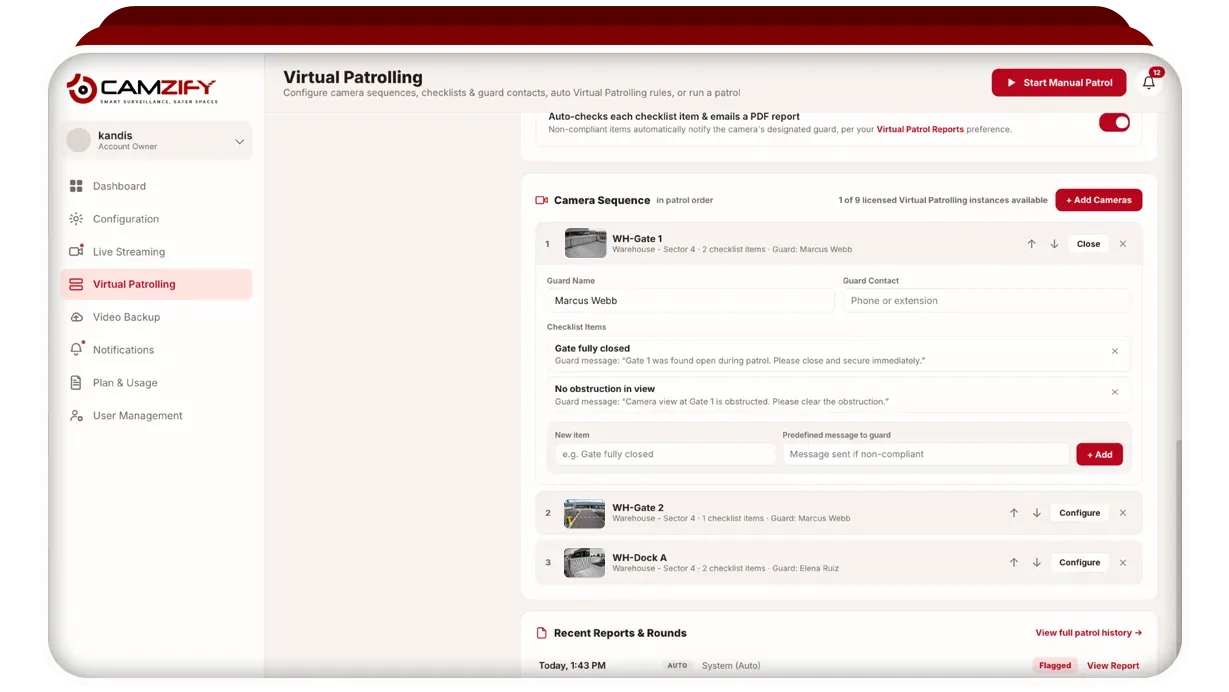
Check alerting by following one alert from the event to the person who acted on it, using a real example from the last month rather than a description of the procedure. A response arrangement is only as good as its weakest name and number, and both go stale without anyone noticing. Virtual patrolling turns the routine part of this into a scheduled round with a record per stop.
- Every alert category is routed to a named person, not to a shared inbox or a group address nobody owns.
- A sample of last month’s alerts was acknowledged within the time the procedure sets, and the acknowledgment is logged.
- The escalation path is written down, and each person on it knows they are on it.
- The after-hours contact list is current, and every number on it was dialed during the audit.
- The intruder alarm was tested and its signal reached the monitoring destination.
- The sources of false alarms are known and are being tuned, not muted.
- Patrol routes are defined, the checks at each stop are written down, and the last round’s record shows each one answered.
What documentation should the audit leave behind?
The audit should leave a record for every item with its result, the time, the person who checked it and the evidence, together with the registers the other sections depend on. That record is what an insurer, a regulator or a client asks for after an incident, and it is what the next audit is compared against.
- Every item above has a recorded result, a time, a name, and a photograph or frame where the item is visual.
- Every failure from the previous audit has a recorded fix, or a recorded reason it is still open.
- An incident report exists for every incident in the period, and each was reviewed by someone other than its author.
- The written retention policy matches the retention actually set on each camera.
- The key register and the credential register are current and were reconciled during the audit.
- Patrol records for the period exist and can be produced for any date on request.
Where routine checks run as virtual patrol rounds, the patrol reports and compliance tracking produce the first and last of those records automatically, with the frame behind each result.
What can be checked between audits?
Any item that is visible from a camera can be checked between audits, on a schedule, without a person walking the route. The items that fail between audits are the physical ones: a door propped open, a gate left unlocked, a camera view obstructed, a corridor blocked. They are also the ones a camera sees and a guard on a round would otherwise have to walk to.
Camzify is one way of doing that. A scheduled virtual patrol round moves through a sequence of cameras, checks a defined list at each one, notifies the assigned guard when an item fails, and files a report with a compliance percentage per round, so the monthly audit finds a record of every night rather than a single snapshot. The policy items, the registers and the alarm test still need a person, and the audit still needs to be walked.