

Cloud VMS for multiple sites: every location on one console
 By Muhammad Talha · Product Manager and CTONine years building computer vision and automated surveillance systems · Updated
 A cloud VMS for multiple sites puts every location's cameras under one account, on one login, with each site kept as its own record. Recording, live view, permissions, alerts and patrol rounds are set per site and read from one console, folded together or held separate. This guide is for whoever runs security or operations across several locations and today carries a recorder login for each.
The model underneath is cloud video surveillance: the cameras stream to a service in the cloud instead of to a box on site. What follows is what that changes when there are five sites rather than one, and what to ask before committing to it.
What changes when several sites move to a cloud VMS?
The recorder at each site stops being the thing you log in to, and the site becomes a record inside one account instead. Each site keeps its own cameras, patrol sequences, operators and event history, and the dashboard reads all of them together or one at a time.
With a recorder per site, every question about the estate is answered site by site, and the sites slowest to open are the ones checked least. A cloud VMS answers the estate-wide questions once, from one screen.
- Every site is set up independently and read from one console, folded together or held separate.
- The dashboard, live wall, notification feed and reports can all be filtered by site.
- Cameras and AI feature instances at every site draw from the same account-wide license pool.
Multi-site management is where this lives in the product, and the multiple sites page covers the operational gaps it is meant to close.
How does one login replace a login per recorder?
The account holds every site, and each person is given a user on that account rather than a password on each recorder. What a user can see and change is decided by their permission group and the sites they are assigned to, so one login can open the whole estate or exactly one store.
The cameras do not need to change. Any camera or recorder that speaks ONVIF or RTSP connects, and a recorder that publishes its cameras as RTSP streams can stay as the source while it keeps its local copy. Cameras behind a router with no public address are reached through the Camzify Connector, a small application on a Windows, macOS or Linux machine inside that site's network, one per site, which makes an outbound connection so nothing is forwarded on the router and no camera is exposed to the internet.
Can a site manager see only their own site?
Yes. A sub-user is scoped to one site, several or all of them, and a permission group decides what they can open and change within that scope. A store manager scoped to their store sees that store's cameras, recordings, alerts and reports and nothing else.
A permission group combines page-level access with create, read, update and delete rights per resource, and every user carries exactly one group. Four groups are built in: Site Admin, Guard, Auditor and Surveillance Manager, and custom groups cover anything those do not.
Sub-users can create their own sub-users, allocating sites, cameras, feature instances and backup storage only from quota they already hold. That lets a regional office manage its own sites without touching the account's commercial terms, and it is how a security agency gives each client a scoped view of that client's cameras. The user management page covers the full lifecycle, including quota requests.
What does the live wall look like across sites?
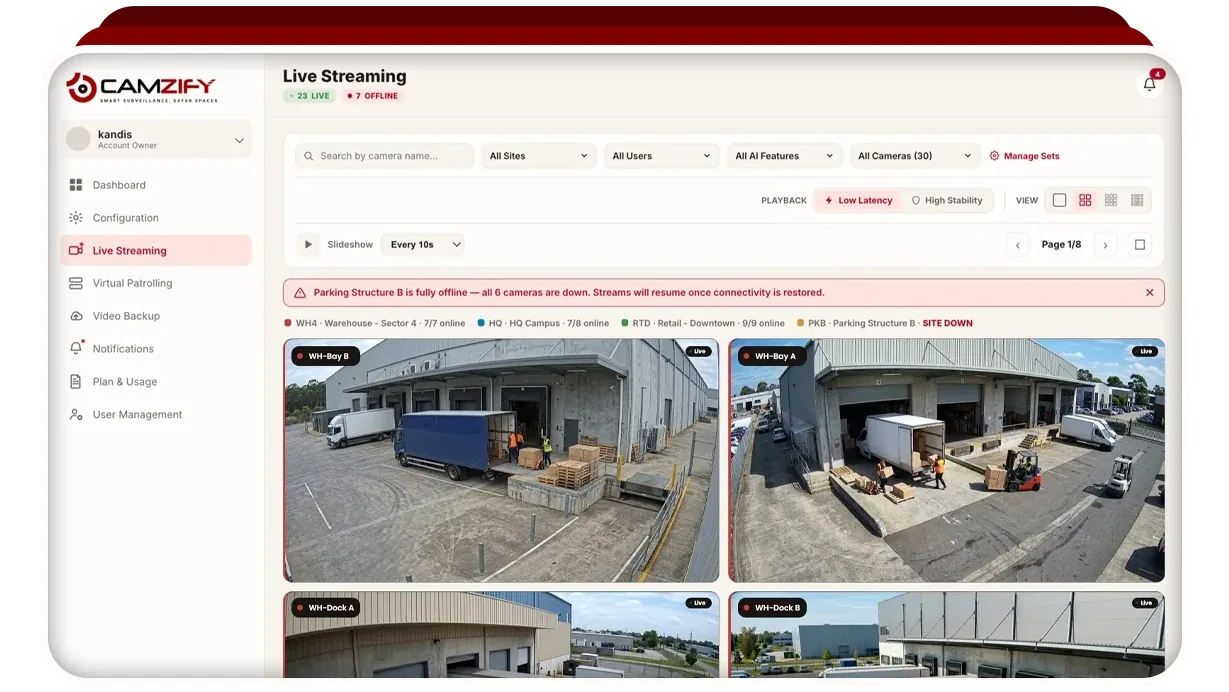
One grid, grouped by site, with a site strip along the top that shows each site's online count. The grid paginates rather than shrinking every camera onto one screen, so each stream stays legible, and a slideshow mode cycles through the pages on its own.
- Saved camera sets hold the cameras that are watched together, and one set can be the default view.
- The grid filters by site, by AI feature or by what a given sub-user is allowed to see.
- A dropped camera shows as no signal at once, never a frozen last frame.
Cameras bought at different times from different installers go on the same wall, because ONVIF and RTSP are on effectively every IP camera sold in the last decade. The use case one live wall for every brand and location walks through that setting.
How are retention and recording set across sites?
Retention is set per camera, by a number of days or by a storage cap, and a recording schedule can be applied to a whole site or to every camera at once. The policy is enforced in the same place the footage lives, so the retention on paper and the retention in the system cannot drift apart between sites.
Per-camera retention is what lets one policy cover an uneven estate. A cash office at one site can keep footage longer than a corridor at another, and a site under a specific licensing condition can hold its footage longer than the rest without a separate system.
Footage is encrypted in transit and at rest and is reached through the same permission groups as live view, so a user who cannot open a camera cannot open its recordings either.
How do patrol rounds run across sites?
A patrol sequence belongs to a site: an ordered list of that site's camera stops, each with its own checklist, on a schedule set by frequency, active hours and active days in the site's own timezone. One operator sees every site's rounds, compliance scores and patrol status from the same console, and each round files its report per site.
Comparable sites can be given the same sequence and schedule, which makes their compliance percentages directly comparable and surfaces the underperforming location. A failed item captures the frame and messages the guard assigned to that camera at that site, so the area manager for one store hears about that store's gate and nothing else. A round does not run across every site at once; each site runs its own, and the console is where they meet.
The multi-site virtual patrolling page covers per-site sequences, assigned guards and how compliance rolls up into one aggregate figure.
What happens when one site's internet drops?
That site's cameras show as offline, the site is flagged in the site list and on the live wall, and the other sites continue as before. Nothing at the other sites depends on the one that dropped, because each site connects to the cloud on its own link.
The site that dropped is shown as a site that is offline rather than blended into the account-wide numbers. Recording happens in the cloud, so a camera that is not streaming is not being recorded until the link returns. A camera that goes dark for another reason is a different case: camera tampering detection raises a covered, turned, defocused or frozen camera to a person with the frame.
How should a multi-site rollout be ordered?
Site by site, with one site finished and approved before the second is started. The first site becomes the template: camera order, checklist wording, retention, recording schedule and escalation contacts, tuned until the people responsible for it agree.
- Run the first site long enough to tune zones, thresholds and the checklist against real footage.
- Apply the template to the next comparable site, and give each local contact a user scoped to their own site.
- Add sites one at a time; a new site rolls into the existing dashboard without disturbing rounds already running elsewhere.
- Compare compliance across the sites that share a sequence, and revise the template rather than each site separately.
Adding a site consumes nothing from the plan by itself; cameras and AI features at the new site draw from the same account-wide pool of instances. The step-by-step is in how to set up sites and cameras.
What should you ask before committing?
Three things, all about your sites rather than the software. A cloud VMS needs upstream bandwidth for every camera streamed, a clear answer to who owns and reaches each camera, and a list of who needs to see what.
- Bandwidth per site: whether each site's upstream capacity can carry every camera you intend to stream. A site with too little, or a policy that footage must never leave the building, should keep its recorder. We do not publish a bandwidth figure per camera.
- Who owns which cameras: whether each camera connects directly, through a recorder that publishes RTSP, or through a Connector on a machine at that site, and who there can keep that machine running.
- How many users, and what each needs: site managers, regional managers, guards and auditors, and which built-in permission group fits each before you define a custom one.
Pricing is per instance per month, quoted for the estate; the pricing page turns your camera and feature counts into a quote request, and Camzify starts from $5 per camera per month.