

How to monitor live camera feeds
 By Muhammad Talha · Product Manager and CTONine years building computer vision and automated surveillance systems · Updated
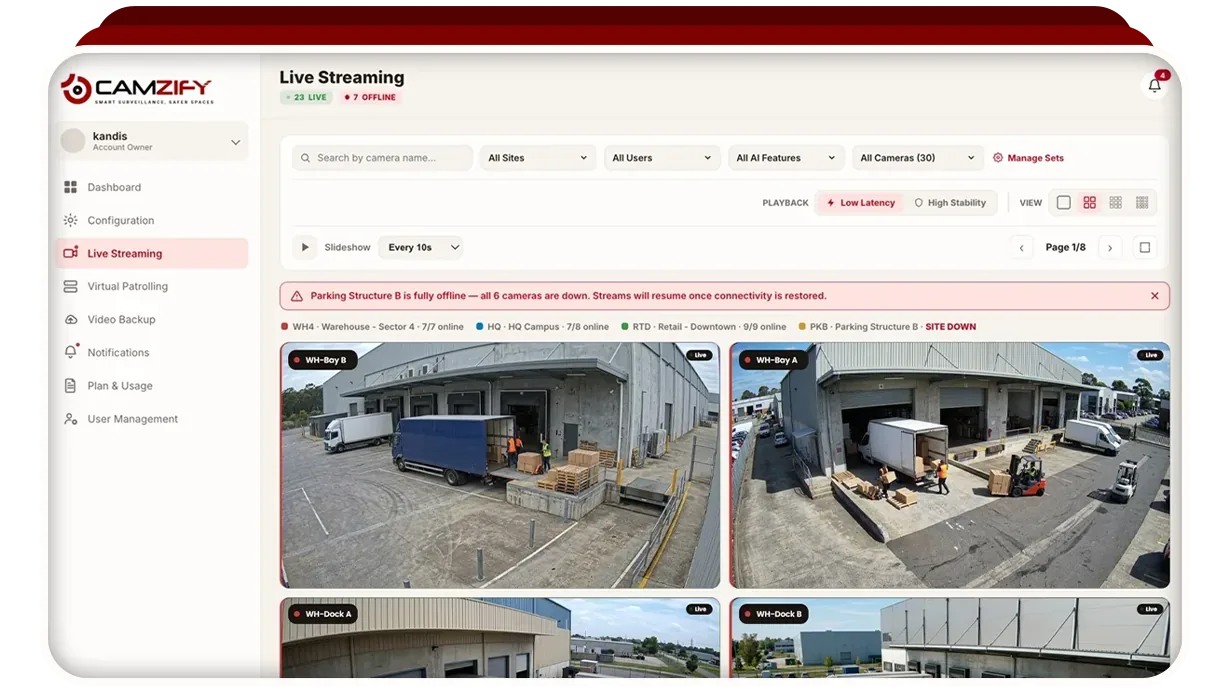
 A live wall answers what is happening now; it does not prove what was checked. This guide covers getting the wall right — layout, saved sets, filtering and full-screen review — and where virtual patrolling picks up the part a wall cannot do.
- 1
Pick a grid that matches how you actually watch
Choose a grid size for how many cameras should be on screen at once. More tiles is not better: past a certain density nobody is really watching any of them, which is the well-documented failure of the traditional monitoring wall. Fewer tiles on the cameras that matter beats a full grid nobody scans.
- 2
Save camera sets for the way shifts actually run
Group the cameras that get watched together into a set, "Night shift, perimeter", "Loading hours, docks", and mark one as the default so it loads when live streaming opens. A set is for watching; it is not the same thing as a patrol sequence, which is an ordered list of stops with checklists attached.
- 3
Filter rather than scroll once the fleet grows
Narrow the wall by site or camera name. This is the difference between a system that stays usable at 200 cameras and one that does not, the wall stops being something you scan and becomes something you query.
- 4
Open a single stream when something needs a proper look
Click any tile for a full-screen view, with PTZ control where the camera supports it. For a camera on a local network, PTZ is carried by the Camzify Connector along with the video.
Research on control-room monitoring has been consistent for decades: attention to a multi-camera wall degrades sharply after the first stretch of a shift. That is the argument for scheduled rounds rather than more screens — a round happens on time whether or not anyone is fresh, and leaves a record either way.
Related: live streaming, running a patrol round, and adding sites and cameras.
Frequently asked questions
See your cameras in a cloud VMS
A 15-minute demo of the live console: cloud recording with retention per camera, live view and AI detections on the cameras you already have. Pricing starts from $5 per camera per month.