

How to run a virtual patrol round
 By Muhammad Talha · Product Manager and CTONine years building computer vision and automated surveillance systems · Updated
 A virtual patrol round is a walk through a defined sequence of cameras, checking a short list of specific things at each one and recording the answer with the frame it was judged against. This guide covers a manual round from start to report. For the automated version, see automated patrol scheduling.
The rule that matters most
An item marked Not Compliant cannot stay that way. Before the round can close it has to be fixed and re-checked, or held as pending with a written reason. That single constraint is what separates a patrol record from a patrol log — a clipboard can be handed in with a problem noted and nothing after it, and nobody finds out until the incident.
- 1
Choose a sequence and start the round
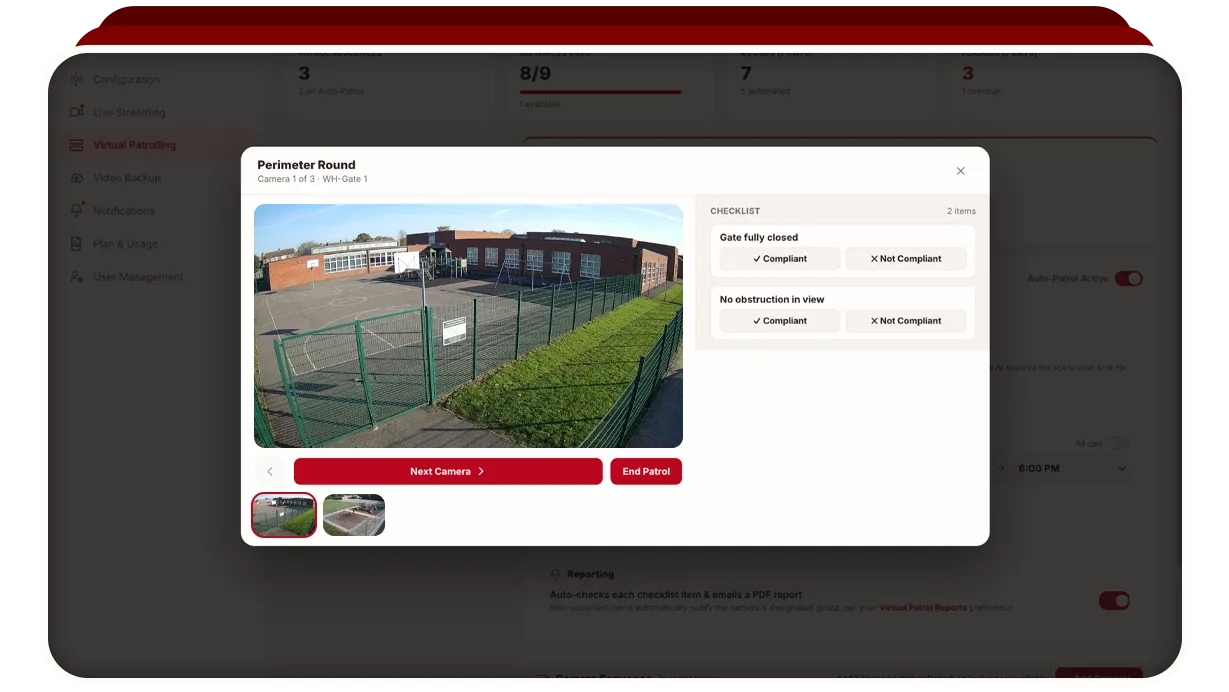
A patrol sequence is an ordered list of camera stops, each carrying its own checklist. Start a manual round and the first camera opens with its live view and that camera’s items beneath it. The guard responsible for the camera is named on the stop, so there is no ambiguity about who to contact if something is wrong.
- 2
Judge each item against the live view
Read the live feed and mark each checklist item Compliant or Not Compliant. This is the part a paper round asks you to take on trust: here the frame you judged is captured with the result, so the answer can be reviewed later against what the camera actually showed.
- 3
Decide whether to message the guard
Marking an item Not Compliant captures the snapshot and offers a pre-written message to the guard for that camera, for example that a gate was found open and needs securing. Send it and the guard is notified immediately with the specifics; decline and the failure is still recorded, and the guard can be notified later from the same item.
- 4
Resolve the item: fixed, or pending with a reason
A failed item cannot be left failing. Either it is dealt with and re-checked, at which point a second snapshot is captured and the item is marked Fixed and verified, or it is held as Pending with a written reason, a contractor blocking a camera view, a part on order. The round will not close until every item has one of those answers.
- 5
Close the round and read the report
Ending the round generates a compliance report, available as a web report or a PDF. It carries the overall compliance percentage, every camera and item with its result, the guard message sent on any failure, the reason on anything pending, and for each fixed item both frames: the camera as found and the same camera afterwards.
Try the round yourself
The homepage carries a working version of this loop: three cameras, live views, and the same rule about resolving a failed item before the round will close. It takes about twenty seconds and ends on a report with the before and after frames attached.
Related reading: how checklists are built, what the report contains, and how guards are notified.
Frequently asked questions
Ready to patrol your site 24/7?
Book a 15-minute demo and see a live patrol run on your own cameras.